July 8, 2026
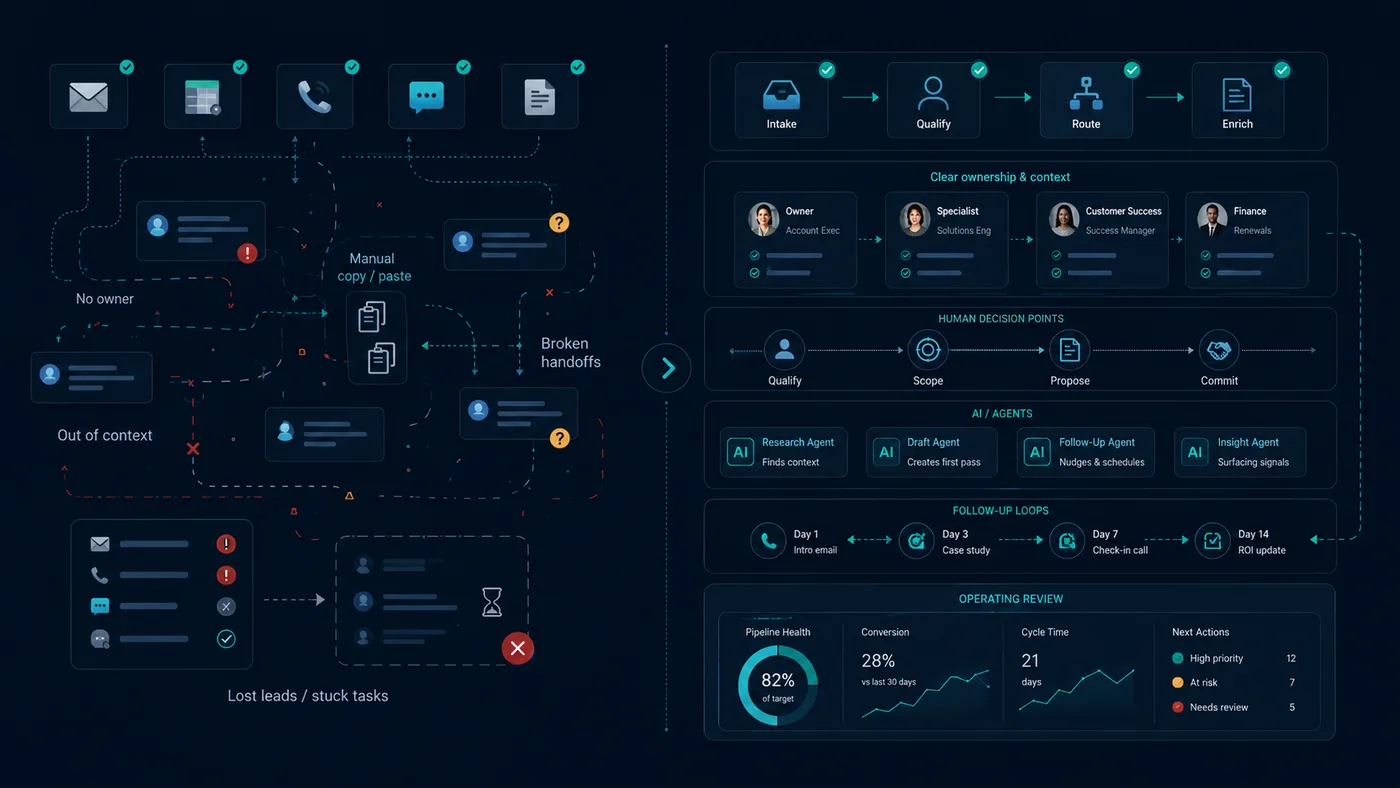
Bad automation makes a task happen faster.
A good system makes the right business behavior happen reliably.
That difference sounds small until you see it inside a company.
A lead gets an auto-reply but nobody owns the follow-up.
A customer gets a chatbot answer but the support team never sees the exception.
A CRM gets updated but the sales process is still unclear.
A dashboard refreshes but nobody changes a decision.
A PDF gets processed but the extracted information lands in a folder nobody reviews.
The automation worked.
The operation did not improve.
That is the trap.
Automation is not the enemy
I am not against automation.
Most of my work involves automation somewhere: workflows, integrations, AI agents, document extraction, reporting, routing, notifications, CRM updates, message classification, scheduled reviews.
Automation is useful.
But automation is only one component of an operating system.
When people buy “automation” as the product, they usually over-focus on the technical trigger:
When X happens, do Y.
That is not enough.
The useful questions are bigger:
- Why does X matter?
- Who owns Y?
- What happens if Y fails?
- What context is required?
- What should happen next?
- What should never happen automatically?
- How will the company know whether the loop improved?
If those questions are ignored, automation becomes decoration.
Sometimes dangerous decoration.
The comparison
Here is the simplest way to see the difference.
| Problem | Bad automation | Good system |
|---|---|---|
| Missed leads | Send an auto-reply | Capture, qualify, assign owner, trigger cadence, review stuck opportunities |
| Slow support | Add a chatbot | Classify requests, answer allowed cases, escalate exceptions, log outcomes |
| CRM mess | Auto-create deals | Define stages, ownership, required fields, next actions, and review ritual |
| Manual reports | Generate dashboard | Produce a weekly operating review that changes decisions |
| Document processing | Extract PDF fields | Validate, route, store, flag exceptions, attach to the right workflow |
| Appointment no-shows | Send reminders | Confirm, reschedule, prepare patient/client, recover missed appointments |
| Repeated questions | Create FAQ bot | Connect knowledge base, policy, escalation, updates, and answer quality review |
| Team confusion | Send Slack notifications | Define ownership, state, deadline, escalation, and source of truth |
Bad automation asks: “Can we make this action happen automatically?”
Good system design asks: “What business loop should become reliable?”
Example: missed leads
The bad version is common.
A lead fills out a form. The system sends an email. Maybe it creates a CRM record. Maybe it posts a Slack notification. Everyone feels better because something happened.
But nobody asks whether the lead was qualified, whether the right person owns it, whether the response was fast enough, whether follow-up is scheduled, whether the opportunity is stuck, or whether the owner reviews lost leads every week.
The automation executes.
The leak remains.
A better system defines the loop:
- Capture every inbound lead.
- Classify source and intent.
- Enrich or request missing information.
- Assign an owner.
- Create or update the record.
- Trigger first response.
- Schedule follow-up cadence.
- Escalate when no owner or no next action exists.
- Review stuck opportunities weekly.
- Improve qualification and messaging based on what happened.
That system may include automations.
But the automations serve the loop.
They are not the loop.
Example: customer support
Bad automation:
Add a chatbot to answer common questions.
Better system:
Build a support intake and routing system that handles common questions, detects exceptions, escalates risky cases, and keeps a record of what happened.
The chatbot is only the edge.
The real value is underneath:
- What categories of requests exist?
- Which answers are safe to automate?
- Which cases need a human?
- Which customers require special handling?
- Where does the conversation get logged?
- How does the team know what is unresolved?
- How are bad answers corrected?
- Who owns the knowledge base?
Without that layer, the chatbot is a liability with a friendly greeting.
Example: reporting
Bad automation:
Build a dashboard.
Better system:
Create an operating review that tells the owner what changed, what is stuck, what needs a decision, and what should happen next.
Most dashboards are monuments to data nobody acts on.
A good report is not a prettier chart.
It is a decision surface.
It should answer:
- What changed since the last review?
- Which promises are at risk?
- Which opportunities are stuck?
- Which process is leaking?
- Which numbers require action?
- What decision is needed this week?
- What should be delegated, automated, paused, or killed?
If the report does not change behavior, it is not a report.
It is wallpaper.
The hidden failure: no owner
A lot of automation failures are ownership failures.
The workflow sends a notification, but nobody is responsible for acting on it.
The agent drafts a response, but nobody approves it.
The CRM field updates, but nobody uses it.
The report lands, but nobody reviews it.
The ticket gets routed, but nobody closes the loop.
A good system names the owner.
Not as an HR formality.
As operating logic.
Every piece of work should have one of three states:
- owned by a human;
- handled by an automated process within clear boundaries;
- explicitly parked or killed.
Anything else becomes operational fog.
The second hidden failure: no review
Automation without review becomes invisible risk.
It runs until it does not. It produces outputs until nobody checks quality. It sends notifications until people ignore them. It updates fields until the fields stop meaning anything.
A system needs review built in.
Weekly is usually enough for small operations.
The review should ask:
- What came in?
- What moved?
- What got stuck?
- What failed silently?
- What did the automation do?
- What did a human override?
- Which rule needs to change?
- Which workflow should be killed?
That last question matters.
Systems get stronger when dead parts are removed.
Where AI fits
AI makes the system more capable because real business inputs are messy.
Customers do not send perfect forms. Salespeople leave voice notes. Suppliers forward PDFs. Managers write incomplete messages. Clients ask ambiguous questions. Documents arrive with inconsistent formats.
AI can translate messy inputs into structured work.
It can classify, extract, summarize, draft, compare, and route.
But AI does not decide the operating model.
It still needs:
- categories;
- policies;
- permissions;
- context;
- review;
- escalation rules;
- definitions of done;
- a source of truth.
Without those, AI makes the mess sound more confident.
A simple rule
Do not automate a task until you understand the loop.
The loop includes:
- Trigger — what starts the work?
- Context — what information is needed?
- Owner — who or what is responsible?
- Action — what should happen?
- Boundary — what should not happen automatically?
- State — where is the work tracked?
- Exception — when does it escalate?
- Review — how do we know it improved?
If you cannot describe those eight parts, you are not ready to automate.
You are ready to map.
That may sound slower.
It is faster than building workflows nobody trusts.
What companies should buy
Companies should stop buying isolated automations.
They should buy reliable business behavior.
A lead intake system.
A follow-up system.
A support routing system.
A document processing system.
An appointment system.
A weekly operating review.
An agent-assisted workflow with clear permissions.
The technical implementation matters. Of course it does.
But it is plumbing.
The product is the loop that stops breaking.
Read next: Don’t build the app by default · I stopped selling automation projects.
I help companies move from scattered automations to business systems: intake, follow-up, support, documents, reporting, and agent workflows. If your automations run but the operation still leaks, contact me.
You can also email me at nicolasdominici@outlook.com or DM me on LinkedIn.